


Summary
A detached garage often gets weak WiFi because distance, thick walls, and metal or masonry materials drain the signal before it crosses the yard. The most effective fixes are a WiFi extender, a powerline adapter kit, or an underground Ethernet cable, which delivers the fastest and most stable connection. Start by testing the signal in the garage and checking your router's age, location, and settings before you buy new gear.
Common Reasons Your WiFi Is So Bad in a Detached Garage
A detached garage is one of the hardest spots on your property to reach with WiFi. Yet more and more homeowners want internet out there for sports scores, how-to videos, and security cameras.
The good news is that figuring out how to extend WiFi to detached garage spaces is easier than it sounds. It starts with knowing why the signal drops off.
If you've struggled to get WiFi to reach the garage, you're not alone. The most common reasons include:
- The garage sits too far from the router.
- The network hardware is in a poor location.
- The network and router settings aren't configured correctly.
- The network hardware you're using is outdated.
- The firmware on your network devices hasn't been updated.
- Other electronics are interfering with the wireless signal.
Metal Garage Doors, Brick, and Concrete Walls Weaken WiFi Signals
You also have to account for the building materials of both the garage and the house. WiFi passes through wood and drywall with little loss, but garages built of metal, concrete, or brick obstruct the signal much more. A steel garage door reflects radio waves like a mirror, which is why your phone often gains bars the moment the door opens. Foil-backed insulation and low-E window coatings add even more resistance.
3 Best Ways to Get WiFi From Your House to a Detached Garage
WiFi signals lose strength with distance and with every wall that stands in the way. Thankfully, some solutions are basic and cost-effective, while others will set you back a little more. Here are the three most effective ways to get internet to the garage:
- Install a WiFi range extender between the house and garage, or configure a second wireless router as a repeater of your home's signal.
- Install a powerline networking kit, which carries the connection from your router to a garage outlet through your electrical wiring.
- Run an Ethernet cable from the router to the garage. It's the most reliable way to get wired internet to a detached garage, though you'll need to dig a trench and bury the cable.
| Option | Cost | Installation | Performance | Best For |
|---|---|---|---|---|
| WiFi extender | Low | Plug in and pair in minutes | Good, but speed drops with distance | Garages that still get some signal |
| Powerline adapter kit | Low to moderate | Plug into outlets, no new wiring | Good to great, depending on wiring | Garages powered by the home's main panel |
| Underground Ethernet | Moderate to high | Trenching and burying cable | Fastest and most stable | Home offices, gyms, and 4K cameras |
None of these solutions is bulletproof. Extenders and powerline kits are the cheapest ways to get WiFi to the garage, so it doesn't hurt to try one before you start digging.
Start Here: Check Your Router and Settings Before You Buy Gear
Before you buy any range extender or powerline kit, check your hardware and WiFi configuration. Both are simple to test and won't cost you anything but a little time.
- Upgrade an aging router or modem. Tech junkies recommend replacing your router or modem every 3 to 5 years because technology evolves so quickly.
- Move your router closer to the garage. A router in the middle of the home gives every room a strong signal, but it rarely does much for the garage or backyard. Shifting it toward the side of the house facing the garage helps more.
- Tweak your WiFi settings. It isn't always the hardware's fault. Switch between the 2.4 GHz and 5 GHz bands; 2.4 GHz reaches farther through walls, while 5 GHz is faster up close.
- Update your firmware. Most routers install bug fixes and performance updates in a few clicks from the app.
WiFi Extender for a Detached Garage: The Easiest Wireless Fix
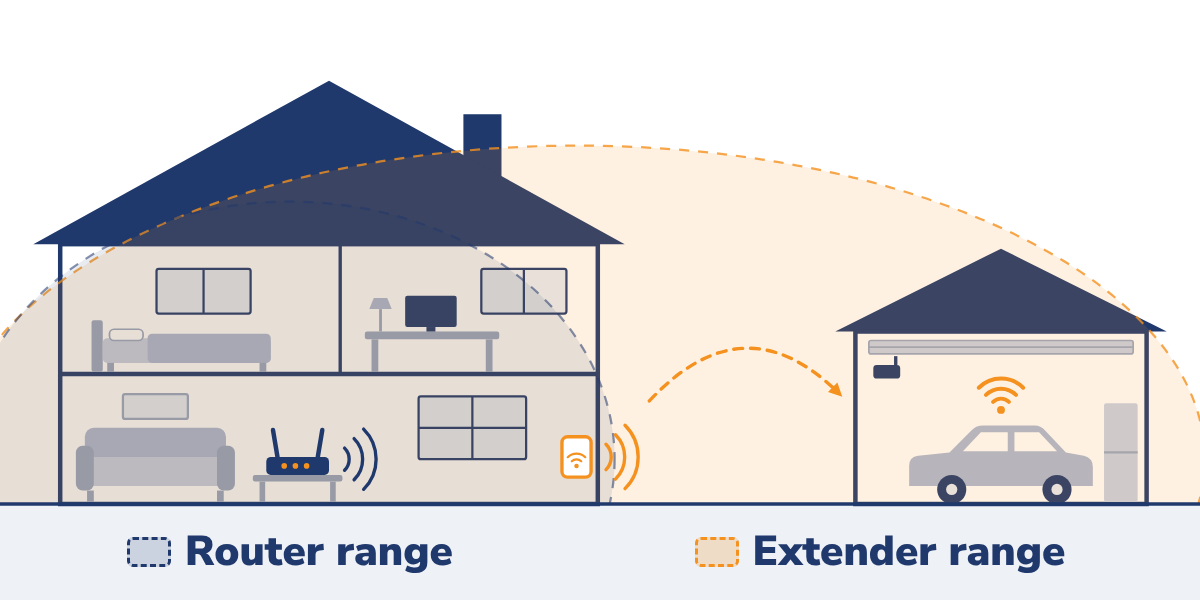
A WiFi extender is often the best way to extend WiFi to a detached garage without running cable. Extenders are also called repeaters, boosters, or relays, so a WiFi booster at the electronics store does basically the same job.
WiFi extenders, as the name implies, stretch the reach of your router's wireless signal. A mesh WiFi system works the same way with smarter handoffs, and one mesh satellite near the garage often beats a basic extender.
Not every WiFi extender for garage use performs the same. Dual-band models with quality antennas and processors tend to have the best performance ratings. Make sure the device is compatible with your router and supports intelligent roaming, which moves your phone to the strongest signal automatically.
WiFi Extender Placement Strategies to Reach a Detached Garage
A WiFi extender works in a detached garage only when it receives a strong signal to repeat. Where you put it matters as much as which model you buy.
- Place it about halfway between the router and the garage.
- Choose a room or window on the side of the house that faces the garage.
- Keep a clear line of sight, since trees, sheds, and parked cars weaken the connection.
- For longer distances, mount an outdoor WiFi extender, or use a pair of point-to-point bridges for garages more than 100 feet away.
Quick Tip
Don't put a WiFi extender deep inside the garage. It can only repeat the weak signal it receives, so place it where your phone still shows at least two or three bars.
Powerline Network Adapters Send Internet Through Your Wiring
Powerline network adapters are generally sold in a kit. One adapter connects to your router and transmits the signal through your home's electrical circuits to a second adapter in the garage. Installation is easier than it sounds:
- Plug one adapter into a wall outlet near your router and connect them with an Ethernet cable.
- Plug the second adapter into an outlet in the garage.
- Run an Ethernet cable to your device, or pair the second adapter with another router if you prefer wireless.
Powerline network adapters are effective and not terribly expensive. Results depend on the age of your electrical wiring and the distance between adapters. They work best when the garage runs off your home's main panel and the adapters plug straight into the wall, not a surge protector.
Run Ethernet Cable Underground for the Most Reliable Connection
For a home office, gym, or security system, the most dependable way to run internet to a detached garage is a buried Ethernet cable. A single Cat6 line carries full-speed data up to 328 feet, with no interference from walls or weather.
- Call 811 a few days before you dig so utility companies can mark buried lines.
- Buy outdoor-rated, direct-burial Cat6 cable, and add a few extra feet for slack.
- Dig a narrow trench at least 12 inches deep, and go deeper under driveways. Local codes vary, so check with your town's building department first.
- Lay the cable in PVC conduit for protection, keeping it away from any buried power lines.
- Seal the entry points on the house and garage against water.
- Connect a switch, router, or WiFi access point in the garage, and test the line before you backfill.
Building a new garage? Ask for an empty data conduit during the electrical stage of your garage build.
The Bottom Line on Getting Reliable Internet in Your Garage
There's no black-and-white answer for better WiFi in a garage, especially a detached one. Start with free hardware and settings fixes, then try a WiFi extender or powerline adapter to extend WiFi to the garage. Save buried Ethernet for when you need maximum speed.
Build a Bigger Garage That's Ready for Work, Hobbies, and WiFi
Before you set up internet in your detached garage, consider upgrading the garage itself. A two-car or three-car garage gives you more space for your vehicles. It also gives you the flexibility to create a garage yoga studio, a man cave, or a she shed.
We've built over 100,000 garages and bring 50 years of trusted service to homeowners across the Midwest. Speak with a specialist and get a free garage quote today.
Frequently Asked Questions About WiFi in a Detached Garage
Is a WiFi extender or a powerline adapter better for a garage?
A WiFi extender is the better pick when the garage is close enough to get some signal, since it needs no wiring. A powerline adapter usually performs better at longer distances, as long as the garage shares your home's main electrical panel.
Will a WiFi repeater slow down my main house internet?
A repeater won't lower the speed of your internet plan, but single-band models can cut speeds by about half for devices connected through them. Dual-band, tri-band, and mesh systems avoid most of that loss.
What internet speed do 4K security cameras in a garage need?
Each 4K camera needs roughly 8 to 16 Mbps of upload speed, depending on its video compression. Test the upload speed inside the garage, not just at the router, since a weak signal there becomes the bottleneck.
How can I test WiFi signal strength in my garage with a smartphone?
Run a speed test app next to your router, then repeat it inside the garage with the door closed. For a precise signal reading, use a WiFi analyzer app on Android or the WiFi scanner in Apple's AirPort Utility app on iPhone; aim for -67 dBm or stronger.


 866-4FELDCO